Key takeaways
- Find the best OBD2 scanner for your car with five diagnostic tools compared by coverage, connection, display, and service functions for home and garage.
- Top Pick: ANCEL AD310 Classic Enhanced OBD II Scanner
- Runner-up: FOXWELL NT301 OBD2 Scanner
- Also consider: BlueDriver Bluetooth Pro OBDII Scan Tool
As an Amazon Associate, we earn from qualifying purchases.
The best OBD2 scanner for most drivers is the FOXWELL NT301, because it reads and clears engine codes, shows live data in text and graph form, checks emissions readiness at a glance, and works without a phone or an app. Drivers who want phone-based repair reports should look at the BlueDriver Bluetooth Pro, while drivers who want the deepest handheld diagnostics should look at the Innova 5610. Budget buyers who only need a simple check-engine-light reader can start with the ANCEL AD310, and drivers who want a full tablet scan tool with service functions should consider the Autel MaxiCOM MK808S.
An OBD2 scanner plugs into the diagnostic port under the dashboard of most cars, trucks, and SUVs built for model year 1996 and later in the United States. The port gives the scanner access to the onboard computer, which stores diagnostic trouble codes when a sensor or an emissions component reports a value outside its normal range. A scanner reads those codes, explains them in plain language, and, on many models, clears them after a repair. More advanced scanners also show live sensor data and readiness monitors for an emissions inspection.
Table of Contents
- How to Choose the Best OBD2 Scanner
- ANCEL AD310 Classic Enhanced OBD II Scanner
- FOXWELL NT301 OBD2 Scanner
- BlueDriver Bluetooth Pro OBDII Scan Tool
- Innova 5610 OBD2 Bidirectional Scan Tool
- Autel MaxiCOM MK808S OBD2 Scanner
- How to Use an OBD2 Scanner
- Frequently Asked Questions
- Conclusion
- Product and ASIN Reference
How to Choose the Best OBD2 Scanner
Start with system coverage. A basic code reader covers the engine and the emissions system, which is enough for a check-engine light caused by a loose fuel cap or a faulty oxygen sensor. A mid-range scanner adds live data, freeze-frame data, and readiness monitors. An advanced scanner adds coverage for the anti-lock braking system, airbags, the transmission, and the tire pressure monitoring system.
Next, consider the connection and the display. A wired handheld scanner has its own screen and buttons and draws power from the vehicle, so it works without a phone or a wireless connection. A Bluetooth scanner has no screen of its own. It plugs into the port, sends data to a phone or tablet, and shows results in an app, which keeps the hardware small and makes reports easy to save and share. A tablet scanner combines a large touch screen with a full diagnostic system, which suits drivers who want service functions and a larger view of live data.
Service functions are the third factor. Oil reset, battery registration, electronic parking brake service, and throttle body relearn are common examples. A basic reader does not offer them, while a tablet scanner offers a wider set. Check the coverage list for the exact year, make, model, and engine before choosing a scanner for a service task, because service functions vary by vehicle.
ANCEL AD310 Classic Enhanced OBD II Scanner
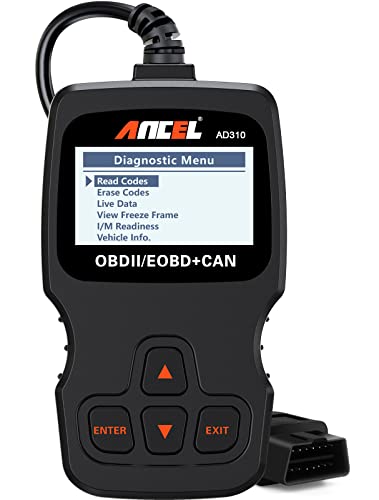
The ANCEL AD310 is a simple wired code reader for drivers who want a fast answer to a check-engine light without a phone, an app, or a learning curve. It plugs into the OBD2 port, draws power from the vehicle, and shows codes on a built-in color screen. Physical buttons and a short menu let a driver read a code, see its meaning, and clear it after a repair with only a few presses.
It supports all ten OBD2 modes, including live data and freeze-frame data, and its I/M readiness function shows whether emissions monitors have completed their checks. It is a budget pick that does not read anti-lock brake, airbag, or transmission codes.
Specs
- Brand: ANCEL
- Model: AD310 Classic Enhanced
- Connection: Wired OBD2 cable, powered by the vehicle
- Display: Color screen with physical buttons
- Systems covered: Engine and emissions
- OBD2 modes: All ten standard modes
- Live data: Yes, with freeze-frame data
- I/M readiness: Yes, with LED indicators
- Vehicle compatibility: OBD2 vehicles from model year 1996 onward
- Protocols: CAN, ISO9141, KWP2000, J1850 VPW, J1850 PWM
- Tier: Budget
FOXWELL NT301 OBD2 Scanner

The FOXWELL NT301 is a wired handheld scanner that adds a larger color screen, a graph view for live data, and a tri-color readiness indicator to the basic code-reader formula. It reads and clears engine codes, shows live data in text and graph form, records data for later review, and checks emissions readiness at a glance. The red, yellow, and green readiness lights give a quick answer before an inspection, while the screen gives the detail behind that answer.
It supports all ten OBD2 modes, and live data shown as a graph makes it easier to spot a sensor that drops out or drifts over time. Pending codes show faults the computer has detected but not yet confirmed. It is a mid-range pick that does not read anti-lock brake, airbag, or transmission codes.
Specs
- Brand: FOXWELL
- Model: NT301
- Connection: Wired OBD2 cable, powered by the vehicle
- Display: Color screen with live data graphing
- Systems covered: Engine and emissions
- OBD2 modes: All ten standard modes
- Live data: Yes, in text and graph form, with data recording
- I/M readiness: Yes, with tri-color LED indicators
- Vehicle compatibility: OBD2 vehicles from model year 1996 onward
- Protocols: CAN, ISO9141, KWP2000, J1850 VPW, J1850 PWM
- Tier: Mid-range
BlueDriver Bluetooth Pro OBDII Scan Tool
The BlueDriver Bluetooth Pro turns a phone or tablet into a diagnostic scanner. The small adapter plugs into the OBD2 port and connects to the BlueDriver app over Bluetooth, where the driver can read codes, view live data, and generate repair reports. The app explains each code in plain language, lists possible causes, and links to repair information for the specific vehicle. That guidance suits drivers who want to understand a fault before deciding whether to fix it at home or take the car to a shop.
It covers the engine, transmission, anti-lock braking system, airbags, and tire pressure monitoring on supported vehicles, and the app can save and share a report. It is a mid-range pick whose limit is its dependence on a phone.
Specs
- Brand: BlueDriver
- Model: Bluetooth Pro OBDII Scan Tool, model LSB2
- Connection: Bluetooth to iPhone or Android app
- Display: Phone or tablet screen through the BlueDriver app
- Systems covered: Engine, transmission, ABS, SRS airbag, TPMS on supported vehicles
- OBD2 modes: All ten standard modes
- Live data: Yes, with freeze-frame data and repair reports
- I/M readiness: Yes, through the app
- Vehicle compatibility: OBD2 vehicles from model year 1996 onward
- Protocols: CAN, ISO9141, KWP2000, J1850 VPW, J1850 PWM
- Tier: Mid-range
Innova 5610 OBD2 Bidirectional Scan Tool

The Innova 5610 is a handheld scanner for drivers who want full-system coverage and bidirectional control without moving to a tablet. It scans the engine, transmission, anti-lock braking system, supplemental restraint system for airbags, and other available systems, and it can send commands to vehicle components on supported models. That bidirectional function lets a driver run active tests such as cycling a fuel pump, commanding a cooling fan, or running an evaporative emissions test, which helps confirm whether a component responds before a part is replaced.
It includes service functions on supported vehicles, including oil reset, battery registration, electronic parking brake service, and throttle body relearn, and it reads hybrid battery cell voltage on supported hybrid models. It is a premium pick, and its tests and service functions vary by vehicle.
Specs
- Brand: Innova
- Model: 5610 CarScan Pro
- Connection: Wired OBD2 cable with Bluetooth to the RepairSolutions2 app
- Display: Color screen with physical keypad
- Systems covered: Engine, transmission, ABS, SRS airbag, TPMS, and other available systems
- OBD2 modes: All ten standard modes
- Live data: Yes, with enhanced manufacturer-specific data on supported vehicles
- Bidirectional control: Yes, active tests on supported vehicles
- Service functions: Oil reset, battery registration, EPB, SAS, DPF regeneration, throttle relearn on supported vehicles
- Vehicle compatibility: OBD2 vehicles from model year 1996 onward, with optional OBD1 coverage
- Tier: Premium
Autel MaxiCOM MK808S OBD2 Scanner
The Autel MaxiCOM MK808S is a tablet scanner for drivers who want a large touch screen, full-system diagnostics, and a wide set of service functions in one device. It runs on an Android-based system, connects to the vehicle through a wired cable, and scans all available systems, including engine, transmission, anti-lock brakes, airbags, body control, and chassis systems on supported vehicles. The seven-inch touch screen shows live data, graphs, and menus in a layout that is easier to read than a small handheld screen, especially when several sensor values need to be compared at once.
It offers service functions such as oil reset, electronic parking brake service, battery reset, and tire pressure monitoring relearn on supported vehicles, plus active tests and bidirectional control. AutoVIN selects the correct vehicle profile, and wireless connectivity adds software updates. It is a premium pick.
Specs
- Brand: Autel
- Model: MaxiCOM MK808S
- Connection: Wired OBD2 cable, wireless updates
- Display: Touch screen tablet
- Systems covered: All available systems, including engine, transmission, ABS, SRS, body, and chassis
- OBD2 modes: All ten standard modes
- Live data: Yes, with graphing and AutoVIN
- Bidirectional control: Yes, active tests on supported vehicles
- Service functions: Oil reset, EPB, BMS, SAS, DPF, TPMS relearn, and more on supported vehicles
- Vehicle compatibility: OBD2 vehicles from model year 1996 onward
- Tier: Premium
How to Use an OBD2 Scanner
Find the OBD2 port first. In most cars it sits under the dashboard on the driver side, near the steering column. With the engine off, plug the scanner in firmly until it seats. Turn the ignition to the on position, or start the engine if the scanner instructions call for live data, then follow the menu to read codes. Write down each code number and its definition before clearing anything.
Read the code definitions before deciding on a repair. A single code can have more than one cause, and a code for a sensor does not always mean the sensor itself has failed. Live data helps narrow the cause. Clear codes only after the repair is complete, then drive through a normal mix of city and highway driving and scan again to confirm the code has not returned.
Frequently Asked Questions
What does an OBD2 scanner do?
An OBD2 scanner reads diagnostic trouble codes from the onboard computer, explains them in plain language, and clears them after a repair. Advanced scanners also show live sensor data and coverage for brakes, airbags, and transmission systems on supported vehicles.
Will an OBD2 scanner work on my car?
Most gasoline cars, trucks, and SUVs built for model year 1996 and later in the United States have an OBD2 port. Coverage for diesel, hybrid, and newer models varies, so check the coverage list for the exact year, make, model, and engine before buying.
Can an OBD2 scanner clear a check-engine light?
Yes, a scanner can clear a check-engine light after the fault has been repaired, and the light should stay off if the repair addressed the cause. Clearing a code without a repair only hides the fault, and the light will return.
Do I need a phone to use an OBD2 scanner?
No, a wired handheld scanner and a tablet scanner work without a phone, because each has its own screen and controls. A Bluetooth scanner needs a phone or tablet and a compatible app to show results.
Conclusion
The FOXWELL NT301 is the best choice for most drivers, because it covers engine and emissions diagnostics in depth, shows live data in a clear graph, and works without a phone. The ANCEL AD310 is the best budget choice for a simple check-engine-light reader. The BlueDriver Bluetooth Pro is the best phone-based choice for repair reports and broad system coverage. The Innova 5610 is the best handheld choice for full-system coverage and bidirectional tests. The Autel MaxiCOM MK808S is the best tablet choice for full-system scans and service functions. Check the coverage list for the exact vehicle before buying, and clear codes only after a repair is complete.